 Outbound
Unlimited mailboxes & warmup
Connect Google Workspace, Microsoft 365 or any SMTP/IMAP mailbox. Warmup for all of them, on every plan.
OutboundLeadPro finds business leads with published emails, scores every address with a free Smart check, sends your sequences from unlimited warmed-up mailboxes, fixes your DNS, and puts every reply in one inbox where AI drafts the answer. Everything runs in the browser. Nothing to download.
These are screenshots of OutboundLeadPro itself, taken from a demo workspace filled with example data.
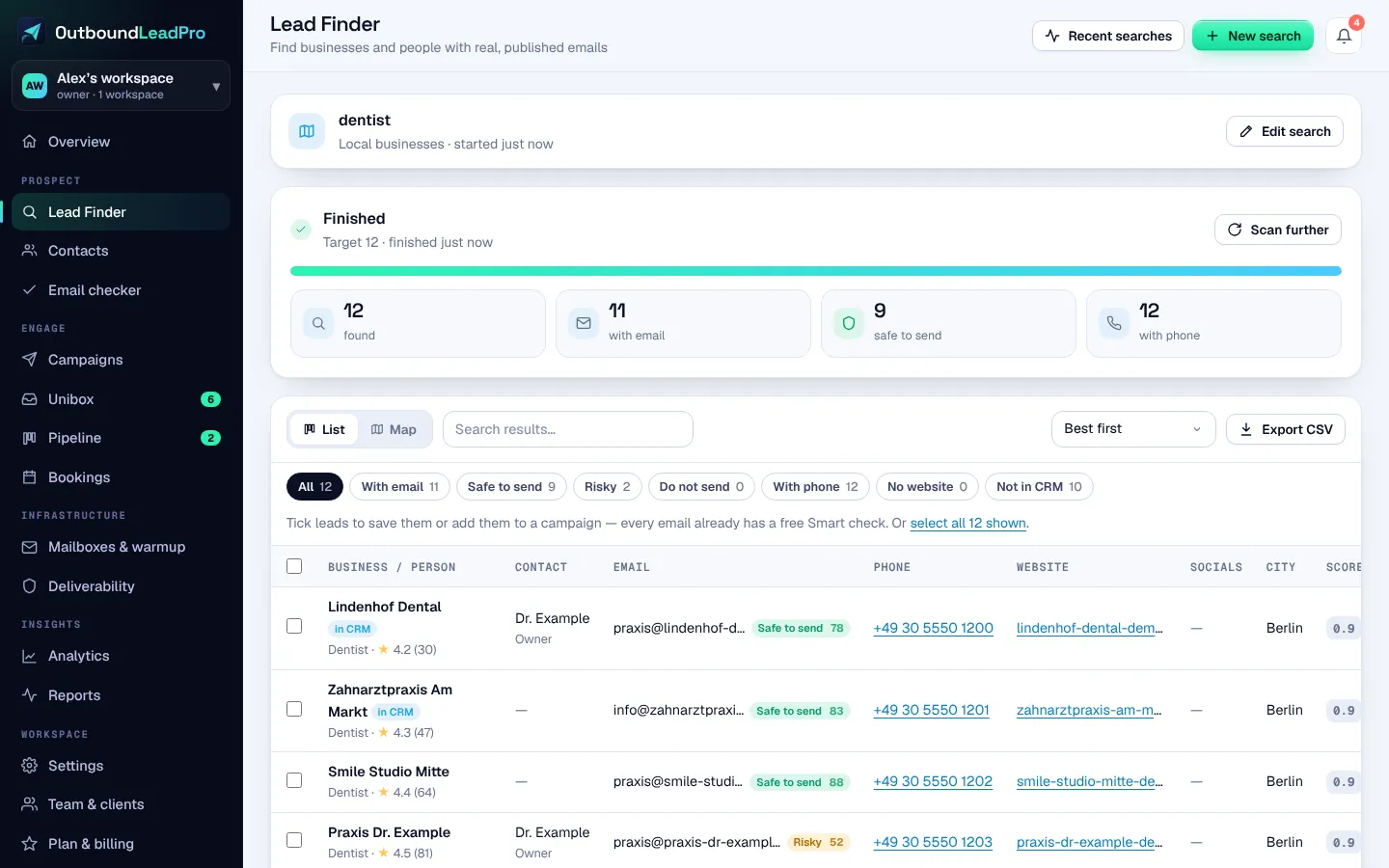
Search “dentists in Berlin” — Lead Finder returns businesses with published emails, each with a free Smart check.
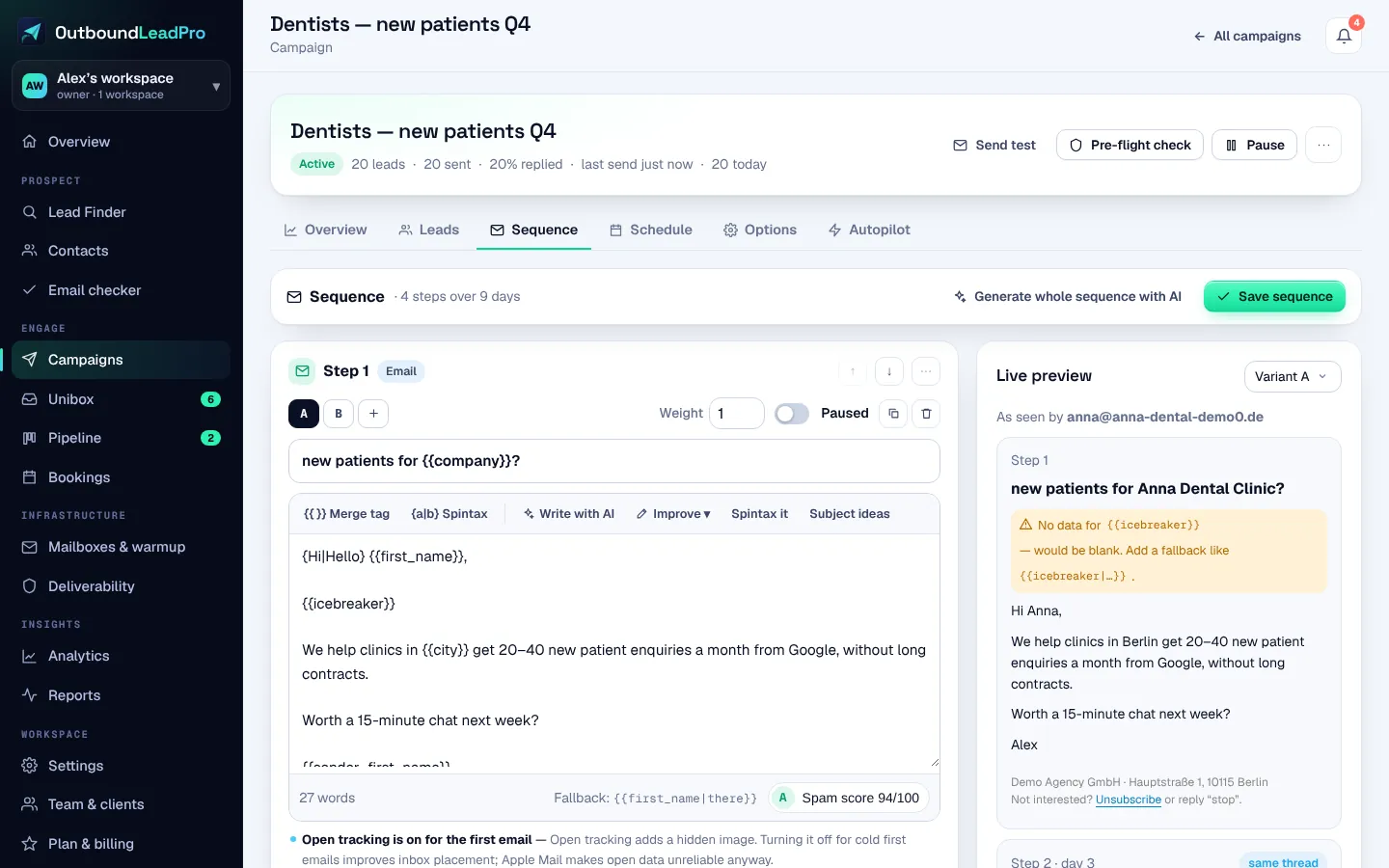
Write (or let AI draft) a few steps, connect your mailboxes and send in each prospect’s business hours.
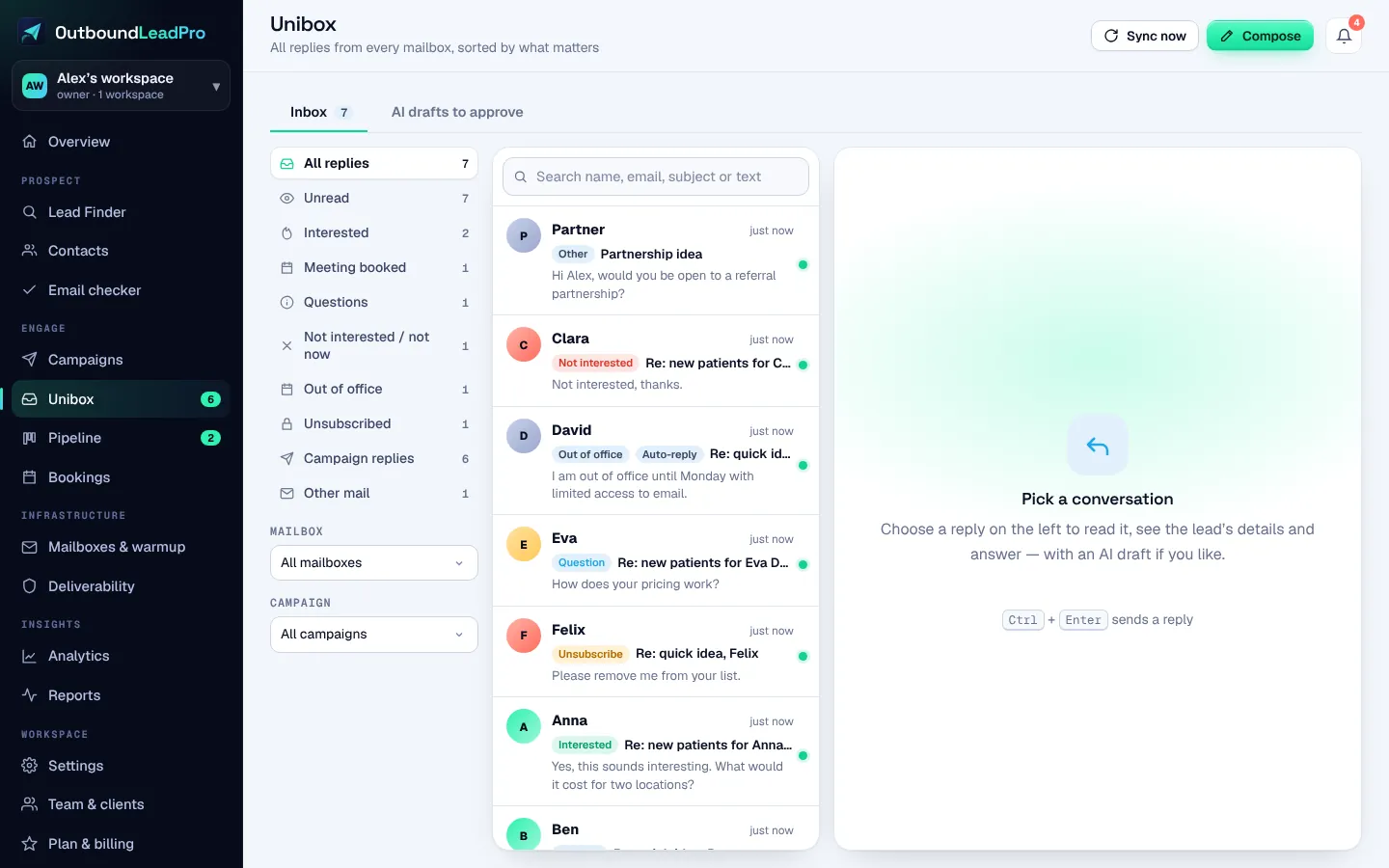
Every reply lands in Unibox, labelled by AI. Interested leads become deals in your pipeline.
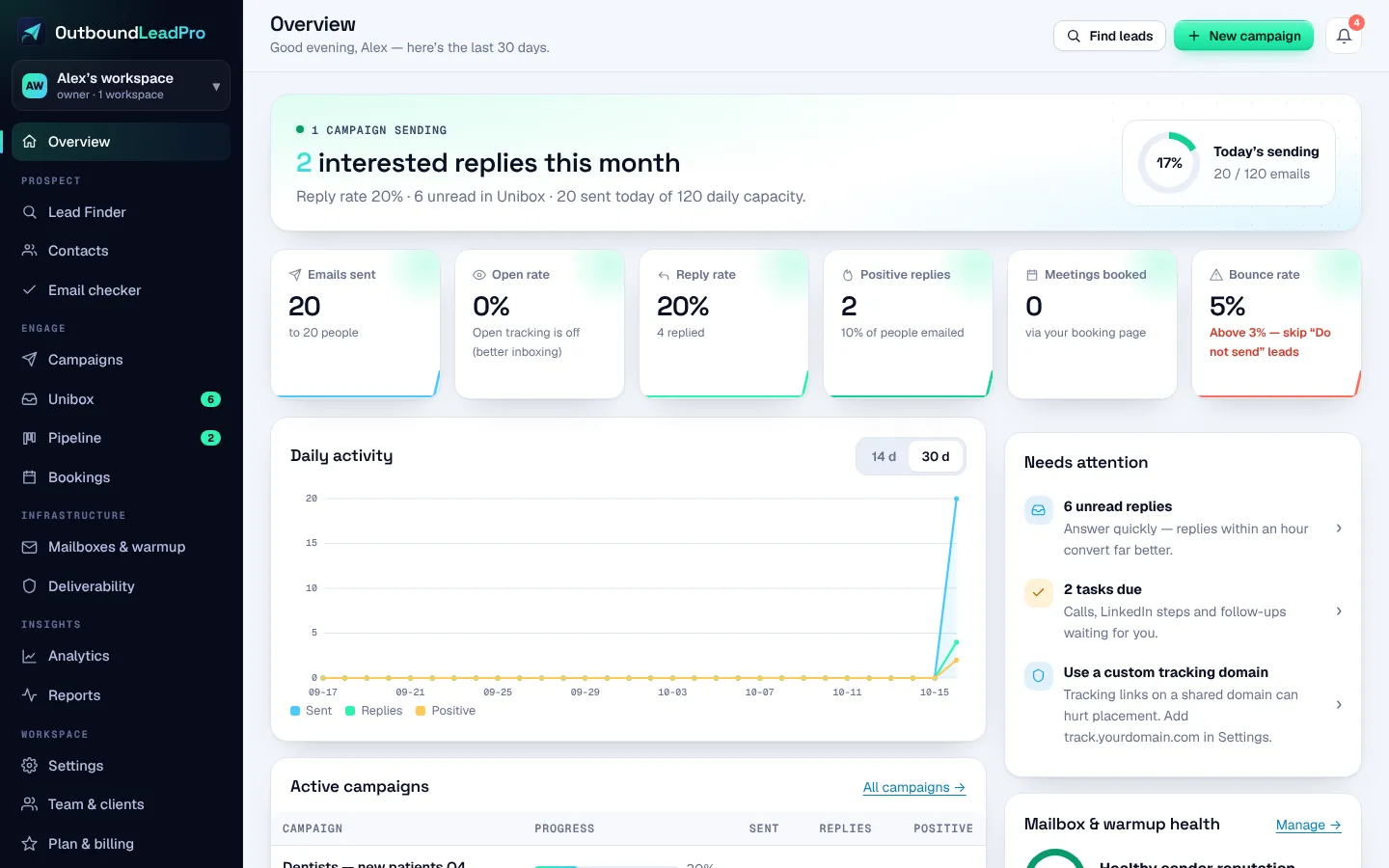
From “who should I email?” to “meeting booked” without stitching five tools together. Click through — this is how it works inside.
Type who you want — “dentists in Berlin”, “roofers in Leeds”. OutboundLeadPro searches map listings, the web and business directories, then visits each website to find the address the business publishes.
Build multi-step campaigns with delays, conditions and A–Z variants. Spintax and merge fields keep every email unique; the AI writer drafts copy in 27 languages from your offer and the prospect’s website.
Replies from all mailboxes land in Unibox. AI labels them — Interested, Meeting request, Not now, Out of office — and drafts an answer you can send with one click, or let the AI SDR send on its own.
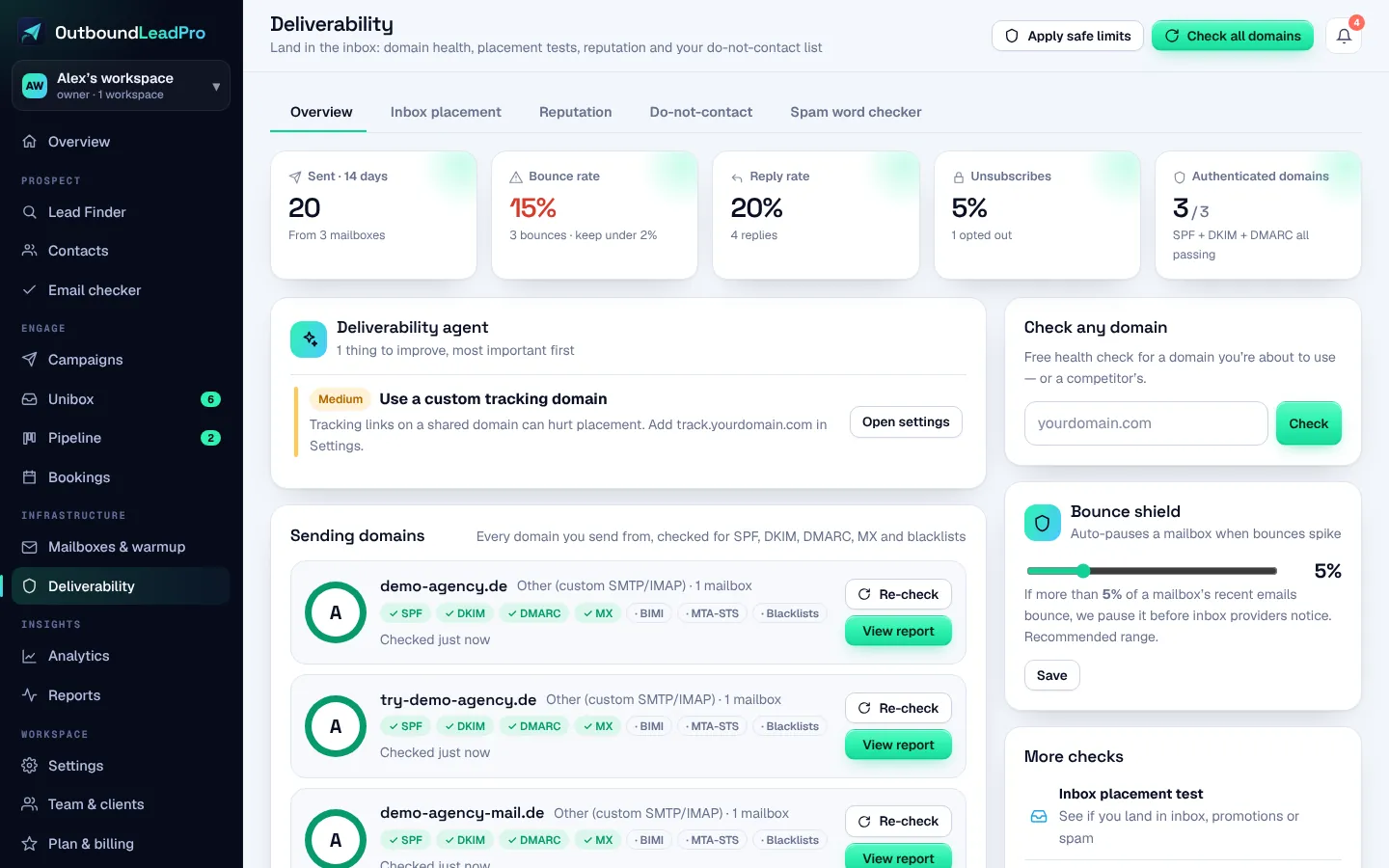
OutboundLeadPro checks SPF, DKIM, DMARC, BIMI, MX, your tracking domain and blacklists for every sending domain — and tells you exactly which record to change. Connect your DNS and we write the fix for you.
Each new mailbox starts slowly and ramps up while warmup emails are opened, replied to and rescued from spam. You see how many land in the inbox versus spam, per mailbox, every day.
Interested replies become deals automatically. Drag them through your pipeline, add tasks, share your booking page, and sync to your CRM if your team lives there.
See sends, replies, positive replies, bounces and meetings per campaign, step, variant and mailbox. Agencies get white-label reports for each client workspace.
Typical outreach stacks sell the CRM, placement tests and lead credits as separate subscriptions. In OutboundLeadPro they come with every plan.
Connect Google Workspace, Microsoft 365 or any SMTP/IMAP mailbox. Warmup for all of them, on every plan.
Spread each campaign across many mailboxes automatically.
New mailboxes start slow and grow their daily volume.
Clicks and opens on your own domain, not a shared one.
RFC 8058 List-Unsubscribe headers added to every email automatically.
Built for the 2024–2025 Gmail, Yahoo and Microsoft sender requirements.
Mailboxes and campaigns pause before bounces hurt your domain.
See inbox, promotions or spam per provider before you scale.
Domains and sending IPs checked against major blocklists.
SPF, DKIM, DMARC and tracking records written for you — or copy-paste instructions for your provider.
Drafts replies to every lead. Approve each one, or let it auto-send.
map listings, the web and business directories.
Every address gets a 0–100 score: published on the company’s own site, mail servers, the company’s email format and our shared bounce memory. No credits, no SMTP probes. Deep checks are there for the rare address you need proven.
A hard bounce anywhere on OutboundLeadPro flags that address for everyone, so you never pay for someone else’s bad list.
Up to 26 variants per step; the best one keeps sending once the data is in.
Proven sequences to start from — and save your own winners as templates.
“Not now” becomes a reminder, “wrong person” a task, opt-outs go on the block list.
Each lead’s time zone is detected from their country and city, so emails land in business hours.
Contacts, campaign leads, replies, deals, tasks and the block list as CSV — any time.
We only use addresses a business publishes itself or that its mail server confirms. No invented info@, no pattern guesses — better for your domain and fair to the people you email.
We try multiple built-in sources in order.
A real pipeline, filled by your replies.
Share your availability; meetings land in the CRM.
Add text steps to any sequence.
Profile visits and messages as reminders in the sequence.
Push events anywhere; automate everything.
Sync contacts and deals both ways.
Client workspaces, team seats and white-label reports.
AI writes and replies in your prospect’s language.
Drafts emails, icebreakers and replies in your voice — included in every plan.
Pick your email provider. OutboundLeadPro knows exactly which DNS records it needs, checks what’s live, and writes the missing ones for you.
Your email provider
Bulk-sender rules we check for you
Covers Gmail and Yahoo’s 2024 bulk-sender requirements and Outlook’s 2025 rules for high-volume senders.
Reading live DNS for yourbrand.com
Sending domains and IPs checked against major blocklists, with an alert the moment one lists you.
A mailbox or campaign pauses itself when bounces or complaints cross your threshold.
Seed tests show inbox, promotions or spam per provider, before you send at volume.
Paste up to 10 addresses, a cold email or your domain. Results in seconds — free, no account needed.
Most cold email tools are good at sending. The difference is what you have to buy on top.
Based on public pricing and help pages reviewed in October 2026. For example: Instantly sells its CRM, inbox placement and lead credits as separate subscriptions; warmup is often a separate paid add-on, and those credits expire monthly. Tools change — check current terms.
Written by customers in the app and published with their permission.
Unlimited mailboxes, warmup and Smart checks on every plan. Start with a 14-day trial — no card.
Prices in USD per month. Cancel any time.
Launch your first campaign risk-free. If OutboundLeadPro isn't right for you within 14 days of your first payment, email us and we'll refund it in full.
No. OutboundLeadPro runs completely in your browser. You connect your mailboxes, add or find leads, and start sending — on any computer.
Yes, on every paid plan. Connect as many Google Workspace, Microsoft 365 or SMTP/IMAP mailboxes as you like; each one gets warmup at no extra cost. Your plan limits how many campaign emails you send per month, not how many mailboxes you use. The free trial includes 3 mailboxes.
From public business sources: map listings, the web and business directories. We only use an email address if the business publishes it itself or its mail server confirms it exists — we never invent or pattern-guess addresses. You can also add your own enrichment sources, or import a CSV.
B2B cold email is allowed in many countries when you follow the rules: an honest sender and subject, a working opt-out, a legitimate reason to contact that business, and respecting opt-outs immediately. Rules differ by country (for example CAN-SPAM, GDPR and UK GDPR, CASL and ePrivacy laws). OutboundLeadPro adds unsubscribe headers and links automatically and keeps a suppression list, but you remain responsible for who you email. See our terms.
For every sending domain we check SPF, DKIM, DMARC, BIMI, MX, your tracking domain and blacklists. You can connect your DNS and approve the changes — we write the records. Anywhere else, you get the exact records for your provider to copy.
Only if you let it. The AI SDR drafts a reply for every incoming message. You choose per campaign whether drafts wait for your approval or are sent automatically.
Yes. Freelancer and Agency plans include separate client workspaces, team seats and white-label reports.
Our Smart check doesn’t pay anyone per address and never knocks on mail servers. It scores each email 0–100 from evidence we already have: whether the business published that exact address on its own website, whether the domain has mail servers, whether it matches the company’s email format, and our shared bounce memory — once any address hard-bounces on OutboundLeadPro, it’s flagged for everyone. You see Safe to send, Risky or Do not send with the reasons, and campaigns can skip “Do not send” leads automatically. Paid plans also include deep checks (1,000 to 5,000 a month) for the rare address you need proven by the mail server.
14 days to explore every screen with no card: 100 Lead Finder results with free Smart checks, 3 mailboxes with warmup, the full campaign builder, Unibox, CRM and deliverability tools — plus 1 campaign email so you can see the whole flow end to end. Deep checks and real sending volume start with a paid plan.
14-day money-back guarantee. Launch your first campaign risk-free. If OutboundLeadPro isn't right for you within 14 days of your first payment, email us and we'll refund it in full. Write to support@outboundleadpro.com from your account email. See our terms.
Nothing is charged — we never asked for a card. Pick a plan to keep sending; your data stays in your account.
OutboundLeadPro is built and run by me, an independent developer who has spent years doing SEO, link building and outreach for clients. I built the tool I wanted: honest leads, no guessed emails, deliverability first. Questions go straight to me — not to a ticket queue.
Connect a mailbox, find your first leads and launch a sequence in an afternoon.
No card. Unlimited mailboxes and warmup. Cancel any time. 14-day money-back guarantee on your first payment.